Google AI Mode, Explained: What It Actually Is and How It Works
AI Mode passed a billion monthly users about a year after launch, and most explainers are already out of date. Here’s what it actually is, how it works, and what changed in the last few months that nobody’s written about yet.
What Is Google AI Mode?
AI Mode is a version is Google Search built around getting a full answer instead of a list of pages to click through.

You access it via the following ways:
Its own tab next to “Images” and “Videos,”
Directly at google.com/aimode,
By asking a follow-up question in an AI Overview answer, or
By clicking “AI Mode” in search box before your first query.
Where a normal search returns links, AI Mode returns a written response that pulls together information from many sources, shows its sources alongside the answer, and lets you keep asking questions without starting over.
Think of it less like a search results page and more like asking a well-read assistant who happens to have access to the entire web and a memory of what you just asked.
What Does Google AI Mode Look Like?
Descriptions only go so far. Here's what to expect from three common types of searches, with screenshots you can grab to show each one.
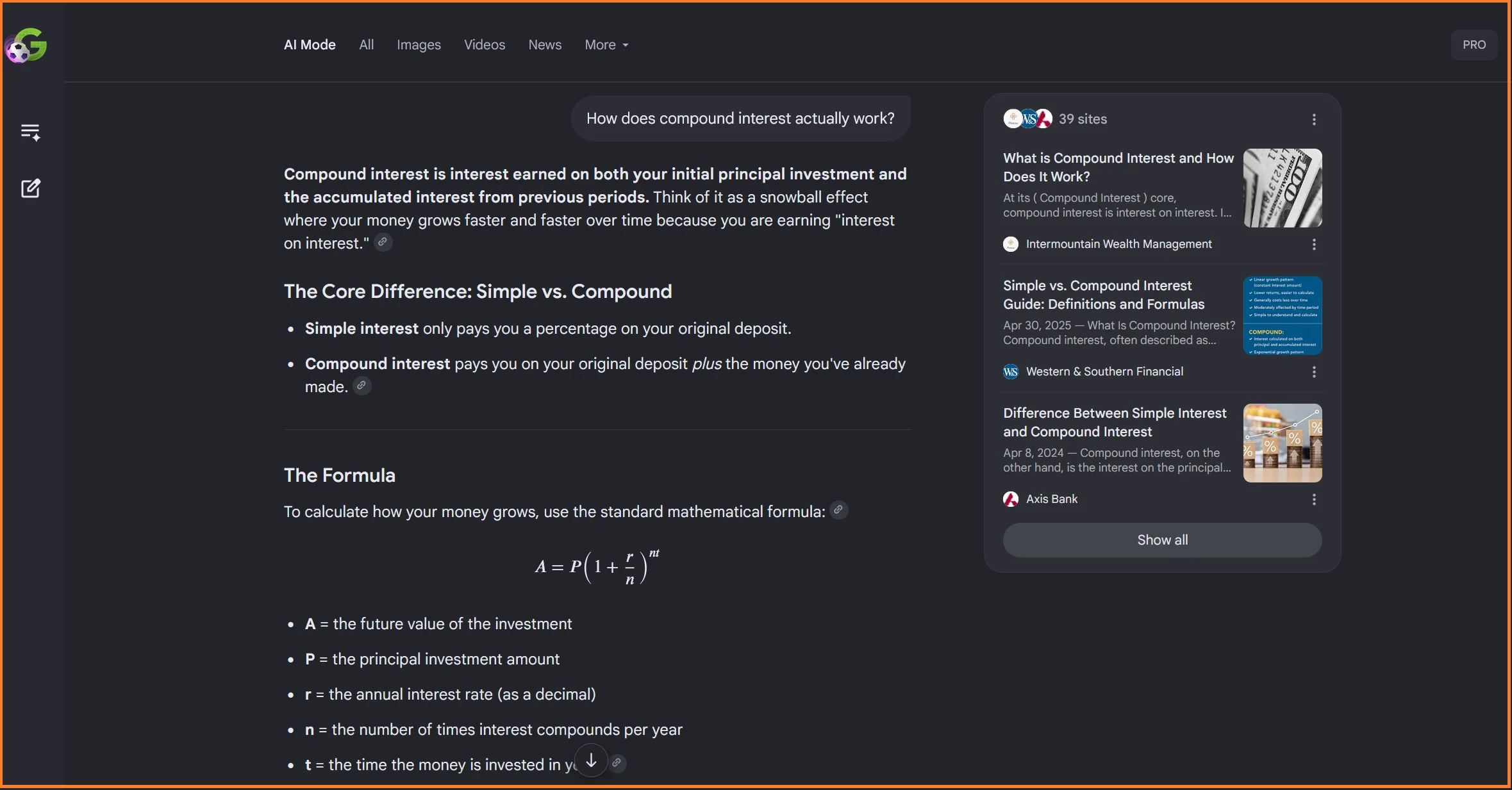
An Informational Question
AI Mode is built for questions that go beyond a quick fact. Ask something with a few layers to it and you'll get a written explanation broken into sections, usually with a list of source domains shown alongside the answer.
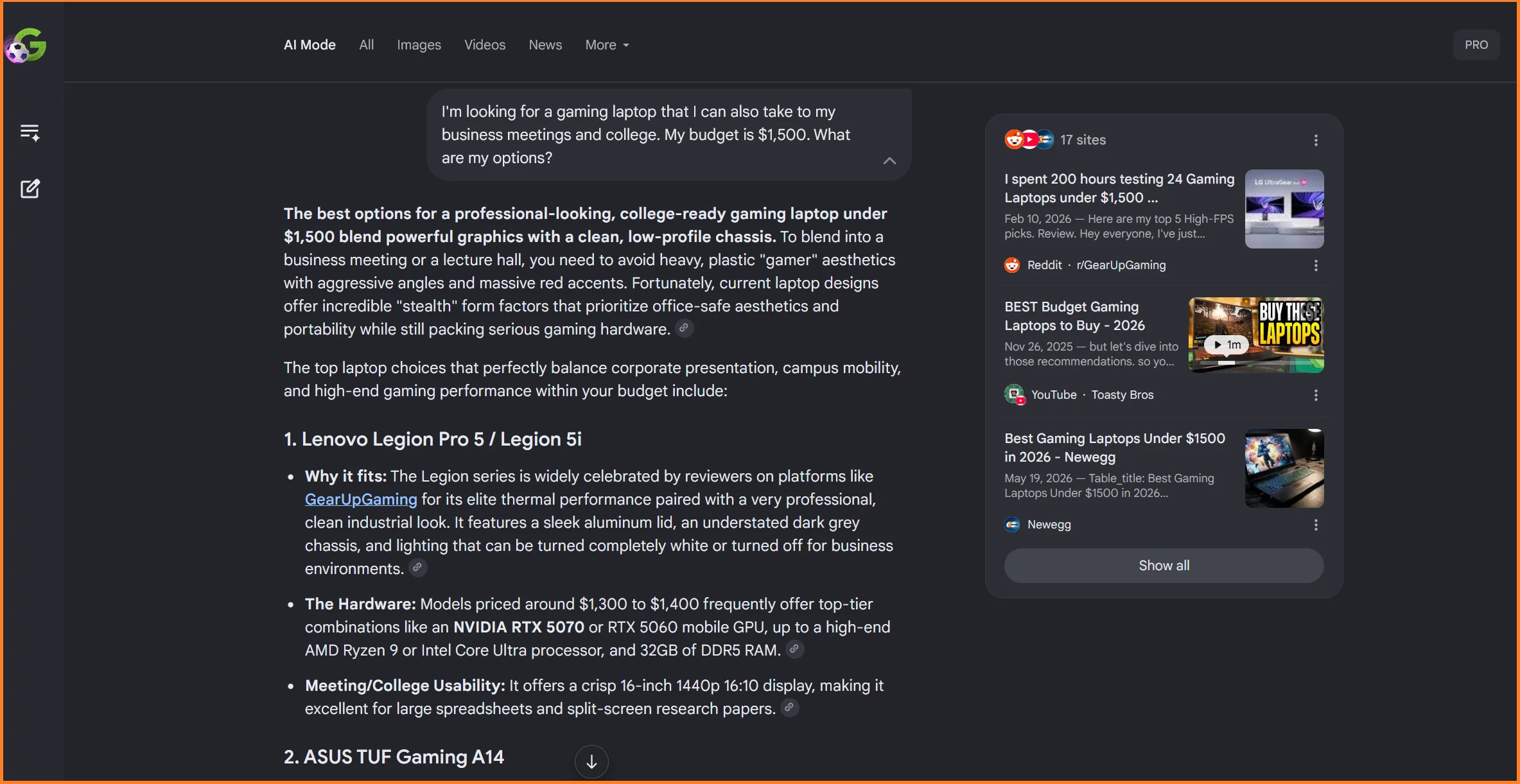
A Product or a Commercial Search
Searches with a clear buying intent return something closer to a comparison. Expect specific product mentions, prices, and reasoning for why each option fits what you asked for.
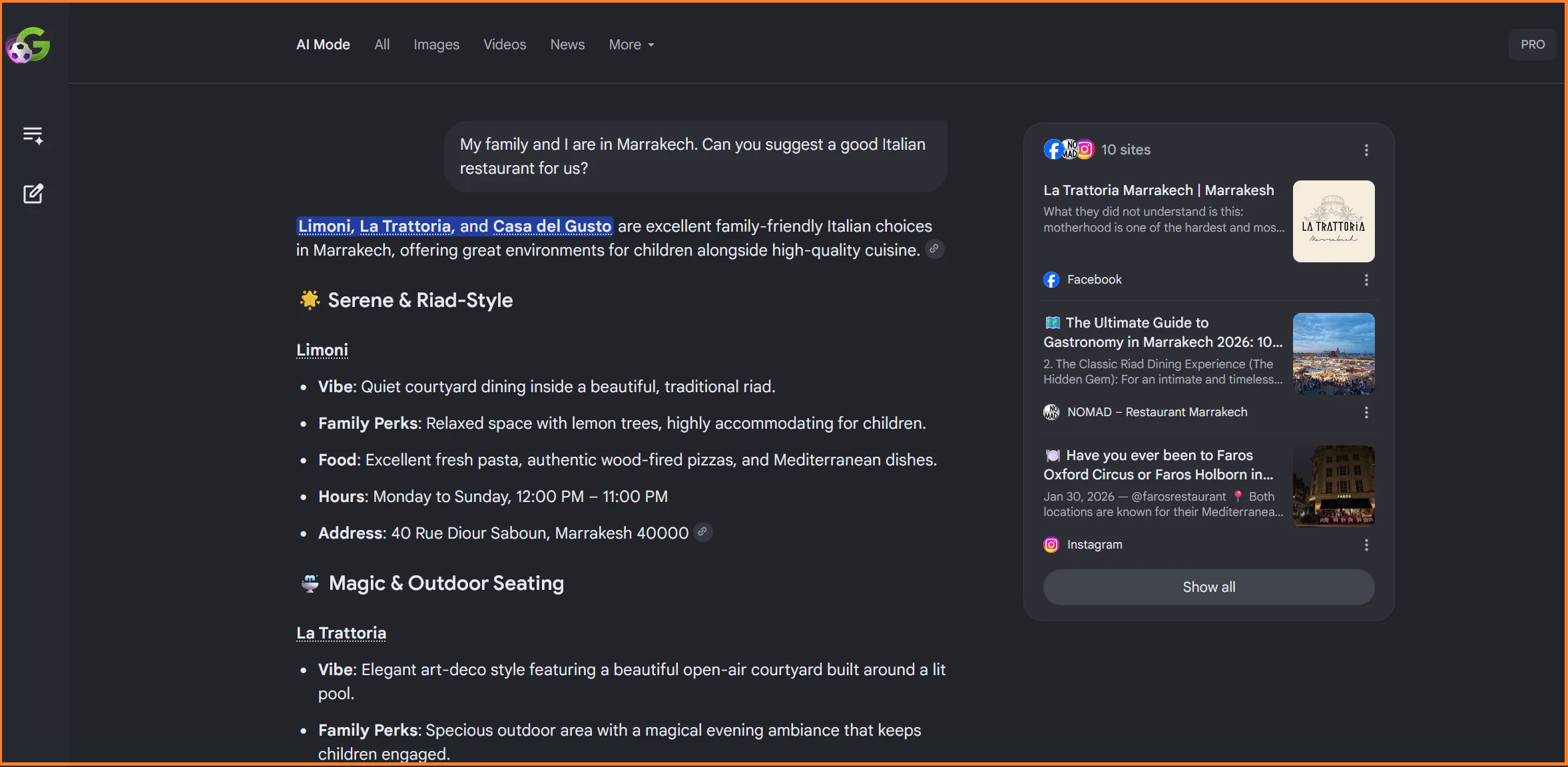
A Local or Booking-Style Search
This is where the agentic side shows up. Ask for something bookable and AI Mode will surface availability and pricing, sometimes with a direct link to finish the booking.
AI Mode vs. AI Overviews: What’s the Difference?
These two get confused constantly because they look similar and run on the same underlying technology. The difference is where they show up and how far they go.
AI Overviews | AI Mode | |
|---|---|---|
Where it appears | Inside regular search results, when triggered | A separate tab or dedicated experience |
What it's for | A quick summary for a moderately complex question | Deeper exploration: comparisons, research, planning |
Interaction | Follow-up possible but directly leads to an AI Mode thread | Full conversation with context retained |
Input types | Text only | Text, voice, and images |
How it searches | Single pass over the index | Query fan-out: multiple sub-searches run in parallel |
Triggers | Selective, only when Google is confident it helps | Broader, for more exploratory or complex queries, like Gemini |
Even though they share the same underlying Gemini infrastructure, AI Mode and AI Overviews don’t actually pull from the same sources most of the time.
Ahrefs analyzed 540,000 query pairs and found the two surfaces cite the exact same URL only about 13.7% of the time, even though they land on a similar conclusion 86% of the time. In other words, they’re reading from the same book but rarely quoting the same page.
How Does AI Mode Actually Work?
AI Mode’s process is fairly intuitive:
You ask a question: Typed, spoken, or with an image attached. AI Mode is built to handle natural, conversational phrasing rather than keyword fragments.
Google figures out what you actually mean: Using context like your location and prior questions, it works out the underlying intent: are you trying to buy something, compare options, or just understand a topic?
It runs several searches at once, not one: This is query fan-out: instead of a single lookup, Google generates a handful of related sub-queries and searches for each, covering more angles than one search ever could.
It pulls and reads from many sources: Results come back from across the web for the main query and every sub-query Google generated.
It writes a single answer from all of it: The findings get pulled into one coherent, natural-language response, with the sources it drew from shown alongside.
The last step is why a click to your website is possible but never guaranteed. The reader already has an answer in front of them, so visiting the source becomes optional instead of the entire point of searching.
Where Is Google AI Mode Available Now?
Several existing explainers are already outdated because this is one of the fastest-moving parts of the story.
As of Google’s I/O announcements in May 2026, AI Mode is available in over 200 countries and territories and close to 100 languages. No VPN, workaround or US-based account is required anymore, despite what some older guides still claim.
The one notable holdout is France, where Google has said ongoing regulatory uncertainty has delayed the rollout of both AI Mode and AI Overviews. Outside of that, availability is now closer to the rule than the exception.
How Big Is Google AI Mode?
Google’s AI Mode is growing rapidly. Here’s a quick breakdown of how it’s trending.
Over 1 billion monthly active users, reached roughly a year after launch, according to Sundar Pichai at Google I/O 2026.
Query volume has more than doubled every quarter since AI Mode launched, according to Google.
Queries run nearly 3x longer than a typical Google search. People ask AI Mode fuller, more specific questions than they'd type into a normal search box, according to Google.
More than 1 in 6 U.S. searches in AI Mode are multimodal (voice or image-based), and image-based queries are growing over 40% month over month, according to Google.
97% of AI Mode responses include at least one citation, typically drawing from around 7 unique domains per query, according to Ahrefs.
At Google I/O 2026, Google also expanded Personal Intelligence inside AI Mode, letting it connect to Gmail and Google Photos (with Calendar coming) to give context-aware answers, and pushed further into agentic search, where AI Mode can handle local bookings and reservations directly inside a conversation instead of just describing options.
What Does This Mean for How People Find Things Online?
If you're a business owner rather than a search engineer, being the page someone clicks is no longer the only way to reach them.
→ Increasingly, you reach them by being the source an AI answer pulls from and credits, sometimes with a link, sometimes without one.
→ That shift is exactly what's behind the rise of generative engine optimization (GEO) as a topic over the past year.
Google has since stated directly that optimizing for its AI features, AI Mode included, isn't a separate discipline requiring special tactics. It's the same SEO fundamentals that always mattered: clear structure, demonstrated expertise, and content that answers a question directly.
📌 Essentially, a page built to rank well on Google is already most of the way to being well-positioned for AI Mode. The two aren’t separate races; they’re judged by overlapping criteria, just applied through a different output format.
How to Show Up in AI Mode Responses
None of this is a special AI trick. It's the same groundwork that drives organic visibility generally, applied with AI Mode's behavior in mind.
Answer the question directly, early: Lead each section with a clear, self-contained answer before elaborating. That's what gets lifted cleanly into a synthesized response.
Structure for scanning, not just reading: Headings, short paragraphs, and lists make content easier for both people and AI systems to extract.
Build demonstrated expertise into the content: Clear authorship, original data, and proper sourcing are what separate a citable page from a forgettable one.
Get the technical basics right: Crawlable, fast, mobile-friendly pages are the entry requirement before any of the rest matters.
Show up beyond your own website: AI Mode pulls from a noticeably wider pool of domains than a typical top-10 search result. Community discussion, third-party mentions, and off-site presence all factor in.
Want this handled for you? Alex, Zaturn's AI SEO agent, audits your website and writes blog posts built for both SEO and GEO from the start. Try Zaturn free for 14 days. No credit card is required.