The 5 Best AI LinkedIn Post Generators in 2026 (Full Review)
Posting consistently on LinkedIn takes time you probably don't have. Here are the 5 best AI post generators in 2026 to help you ditch the blank page, fix your content bottleneck, and get back to business.
LinkedIn drives the vast majority of B2B social media leads, but most small businesses post inconsistently or not at all because keeping up with it takes hours most teams don’t have.
An AI LinkedIn post generator is built to fix that. The issue is that not all of them work the same way: some write captions when you ask, while others run your LinkedIn presence for you. Picking the wrong one trades one bottleneck for another.
This guide covers the 5 best options in 2026 and helps you pick the right fit.
Short Answer
The best AI LinkedIn post generator depends on what you actually need.
If you want your LinkedIn presence to run itself (with a trained AI agent that plans, writes, and schedules on your behalf), Zaturn's Chloe does that from $69/mo.
If you want AI to generate LinkedIn content on demand with scheduling and performance tracking, MagicPost ($49/mo.) and Taplio ($69/mo. for AI features) are the dedicated LinkedIn platforms.
If you manage multiple social channels and want AI writing alongside scheduling, Buffer covers LinkedIn as part of a broader suite.
What Is an AI LinkedIn Post Generator?
An AI LinkedIn post generator is a tool that uses artificial intelligence to create LinkedIn content for you: writing captions in your brand voice, structuring posts for LinkedIn’s format, and in some cases handling scheduling and visuals too.
The keyword is “for you.” The tool should take the production work off your plate so you can stay focused on running your business.
With that out of the way, “AI LinkedIn post generator” covers a wide range of tools, from free caption generators to full AI agents that plan and run your LinkedIn presence autonomously.
The difference between those two extremes is significant, which is why understanding the type of tool you're looking at matters before you spend anything.
What Type of AI LinkedIn Post Generator Do You Need?
Before comparing tools, it’s worth understanding the four types of product in this space. They solve different problems, and choosing the wrong category wastes money regardless of which specific tool you pick.
Type | What it does | Who drives | Example tools | Starting price |
|---|---|---|---|---|
Writing and formatting assistant | Helps you format and structure posts you've already written. No or limited AI generation. | You write everything | AuthoredUp | $19.95/mo. |
LinkedIn-dedicated AI platform | AI generates posts on demand, plus scheduling, ideas, analytics, and performance tracking. LinkedIn only. | AI assists, you decide | MagicPost, Taplio, Supergrow | $69/mo. |
Multi-platform scheduling suite with AI | AI helps write and repurpose content across all your channels. Scheduling and analytics are the core. | AI assists, you decide | Buffer | From $6/mo. |
AI social media agent | AI plans your calendar, writes posts, generates visuals, and queues everything for your approval, continuously, across all platforms. | AI operates, you approve | Zaturn (Chloe) | $69/mo. |
💡 The question to ask yourself is: Do you want to write with AI helping you, or do you want AI to handle the writing while you approve the output?
The 5 Best AI LinkedIn Post Generators
With definitions out of the way, here are the five best AI LinkedIn post generators to explore in 2026.
1. Zaturn (Chloe) — Best for Hands-Off LinkedIn Execution
Zaturn is best for SMBs and solopreneurs who want their LinkedIn presence to run itself rather than just be easier to manage. It currently holds a 4.0 rating on Trustpilot.
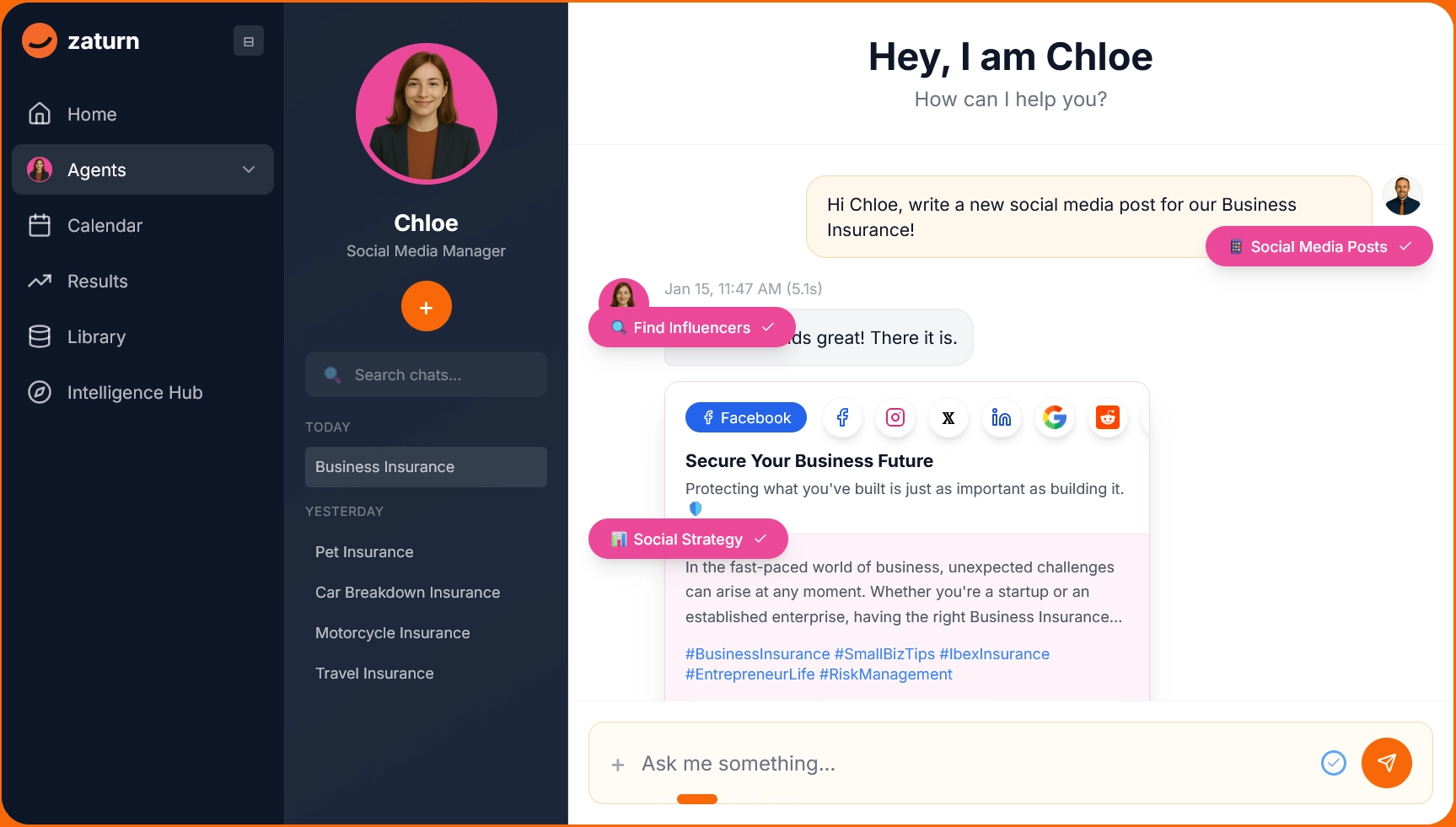
Most AI LinkedIn post generators wait for you to ask, but Chloe doesn't. She's an AI social media assistant that plans your LinkedIn content calendar, writes platform-specific posts in your brand voice, generates on-brand visuals, and queues everything for your approval week after week, without prompting.
LinkedIn rewards consistent posting above almost everything else and Chloe makes consistency automatic. Every post draws from the Intelligence Hub, a permanent store of your brand voice, audience, and assets. You don’t need to re-brief her between sessions.
Unlike every other tool on this list, Chloe covers several channels, including LinkedIn, Facebook, Instagram, and X from one platform.
Notable Features
Content calendar planning: Chloe maps out your month based on your goals, industry, and trending topics, so you always have a full queue ready to review.
LinkedIn-specific caption writing: She writes posts formatted for LinkedIn's content norms, including a hook, strategic line breaks, and a clear call-to-action.
On-brand image generation: Every post comes with an AI-generated visual using your brand colors and logo, or you can upload your own. They’re auto-sized for LinkedIn's aspect ratio requirements.
Intelligence Hub: Permanent brand context shared across all other agents. One setup, consistent voice, and no re-prompting between sessions.
Approve-before-publish: Every post goes through your review queue before anything goes live. You edit, swap images, reschedule, or approve as-is.
Multi-platform: LinkedIn, Facebook, Instagram, and X are managed from the same platform, with platform-specific formatting for each.
Pros and Cons
Pros | Cons |
|---|---|
✅ As an AI agent model, she operates, and you approve. Not a tool you have to activate each time | ❌ Higher entry price than LinkedIn-only tools if you only need one channel |
✅ Permanent brand memory, no re-briefing between sessions | ❌ Newer platform with fewer reviews than established tools |
✅ Covers all channels, not just LinkedIn | |
✅ Visual generation included alongside caption writing |
Pricing
Plan | Monthly Price | What's Included |
|---|---|---|
Starter | $69/mo. | All 6 agents, 1 workspace, 1 user, unlimited content generation, email support, 14-day free trial |
Growth | $129/mo. | Everything in Starter, 3 workspaces, 3 users, priority support, onboarding call, 5x more usage |
Custom | Talk to Sales | Unlimited posts and campaigns, white-label, multi-brand management, dedicated success manager |
✅ Zaturn is the right choice if you want your LinkedIn presence to run itself rather than be a weekly task. If you’re still the one deciding what to post every time, Zaturn changes that model entirely.
2. MagicPost — Best LinkedIn-Dedicated Platform for Creators
MagicPost is best for solopreneurs, founders, and marketers who want a complete LinkedIn content system (AI writing, scheduling, performance tracking, and inspiration) in one LinkedIn-native platform. It currently holds a 4.7-star rating on Trustpilot.
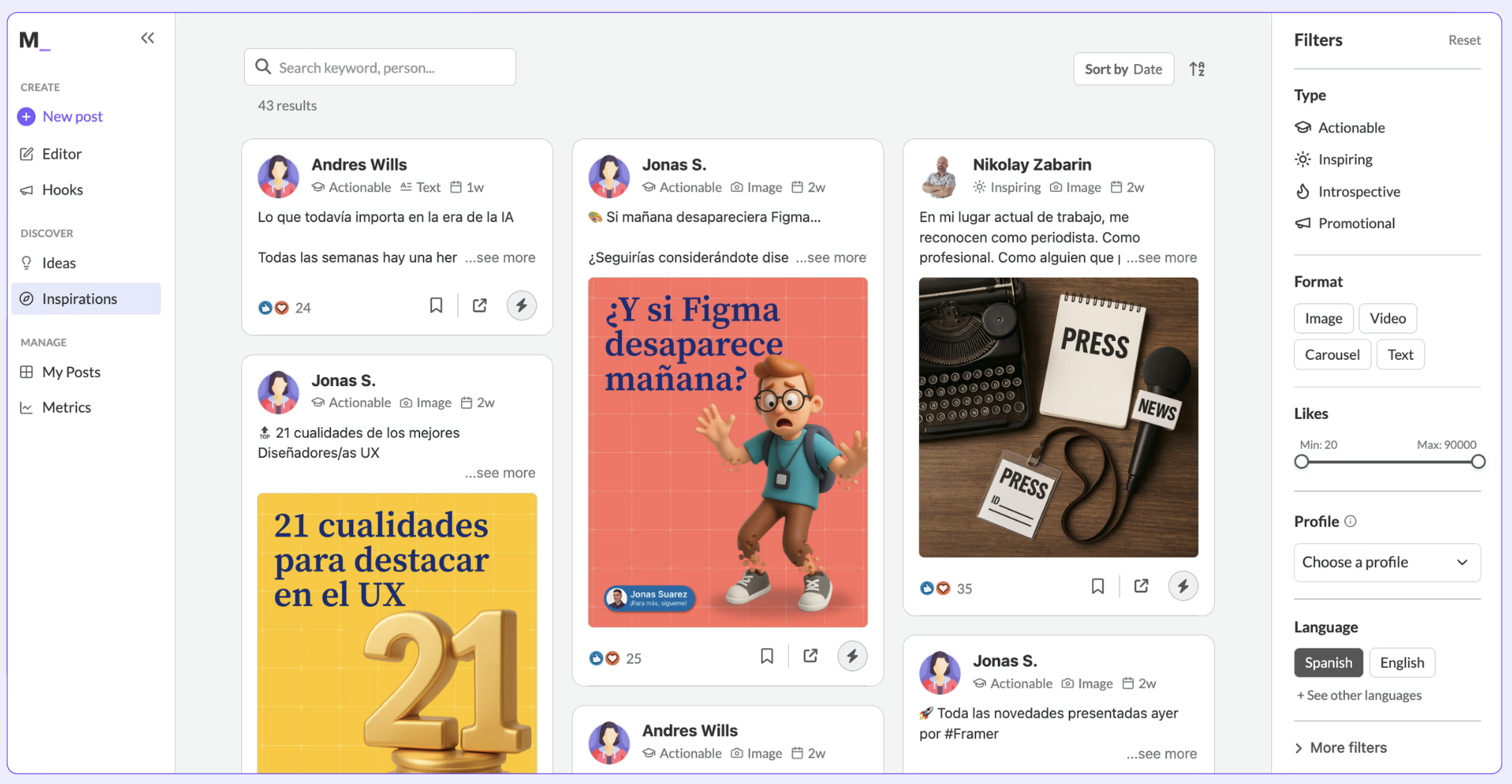
MagicPost is a LinkedIn-dedicated AI post generator built to take you from blank page to scheduled post with as few steps as possible. You input your topic, style, and objective; the AI drafts it, you refine it, and you schedule it directly without leaving the platform.
What separates MagicPost from other LinkedIn AI tools is the depth of its content system. The ideas generator surfaces 6 post concepts on demand. The hook generator focuses specifically on your opening line, which is the most important two words on LinkedIn, while a viral post library of 500,000+ filterable posts shows you what's working in your niche.
As a LinkedIn verified partner, there are no account safety concerns.
Notable Features
AI content generator: Input your topic, style, and objective. MagicPost drafts a LinkedIn post with the right structure and tone. Paste a URL, and it turns any article, blog post, or press release into a post.
Ideas generator: Select a theme and get 6 different post concepts immediately. It solves the blank-page problem before you even start writing.
Hook generator: Focused specifically on opening lines. It generates curiosity, emotion, or urgency-based hooks tailored to your topic.
Viral post library: 500,000+ LinkedIn posts filterable by format, engagement count, date, language, and niche. Find what works in your space and ask MagicPost's AI to adapt it to your voice.
Post templates: Save your best-performing post structures as reusable templates. MagicPost's AI uses them for new content so your style stays consistent without heavy editing.
Direct scheduling and analytics: Schedule posts from inside the platform with timing recommendations. Track impressions, likes, and posting rhythm in the same dashboard.
Pros and Cons
Pros | Cons |
✅ LinkedIn verified partner — no account safety concerns | ❌ LinkedIn only — not useful if you need multi-platform management |
✅ Complete system from ideas to scheduling to analytics in one platform | ❌ Starter plan limited to 20 posts per month |
✅ Hook generator is a genuinely useful LinkedIn-specific feature | ❌ No visual generation — you provide or source your own images |
✅ Viral post library gives you real inspiration from your niche | ❌ Brand voice customization takes initial time to calibrate |
Pricing
Plan | Monthly Price | What's Included |
|---|---|---|
Starter | $49/mo. | 20 posts/mo., AI content generator, ideas and hooks generator, editor |
Creator | $69/mo. | Unlimited post generation, scheduling, post templates, 500K viral posts library, advanced analytics |
Agency | Custom | Multiple LinkedIn accounts, team collaboration, dedicated account manager |
✅ MagicPost is the strongest LinkedIn-dedicated platform for creators who want AI writing, scheduling, and performance tracking in one place. The ideas and hook generators are genuinely useful additions that go beyond what most tools offer.
3. Taplio — Best for LinkedIn Growth and Lead Generation
Taplio is best for sales professionals, agencies, and founders who want AI LinkedIn content combined with engagement automation and access to a 3M+ lead database.
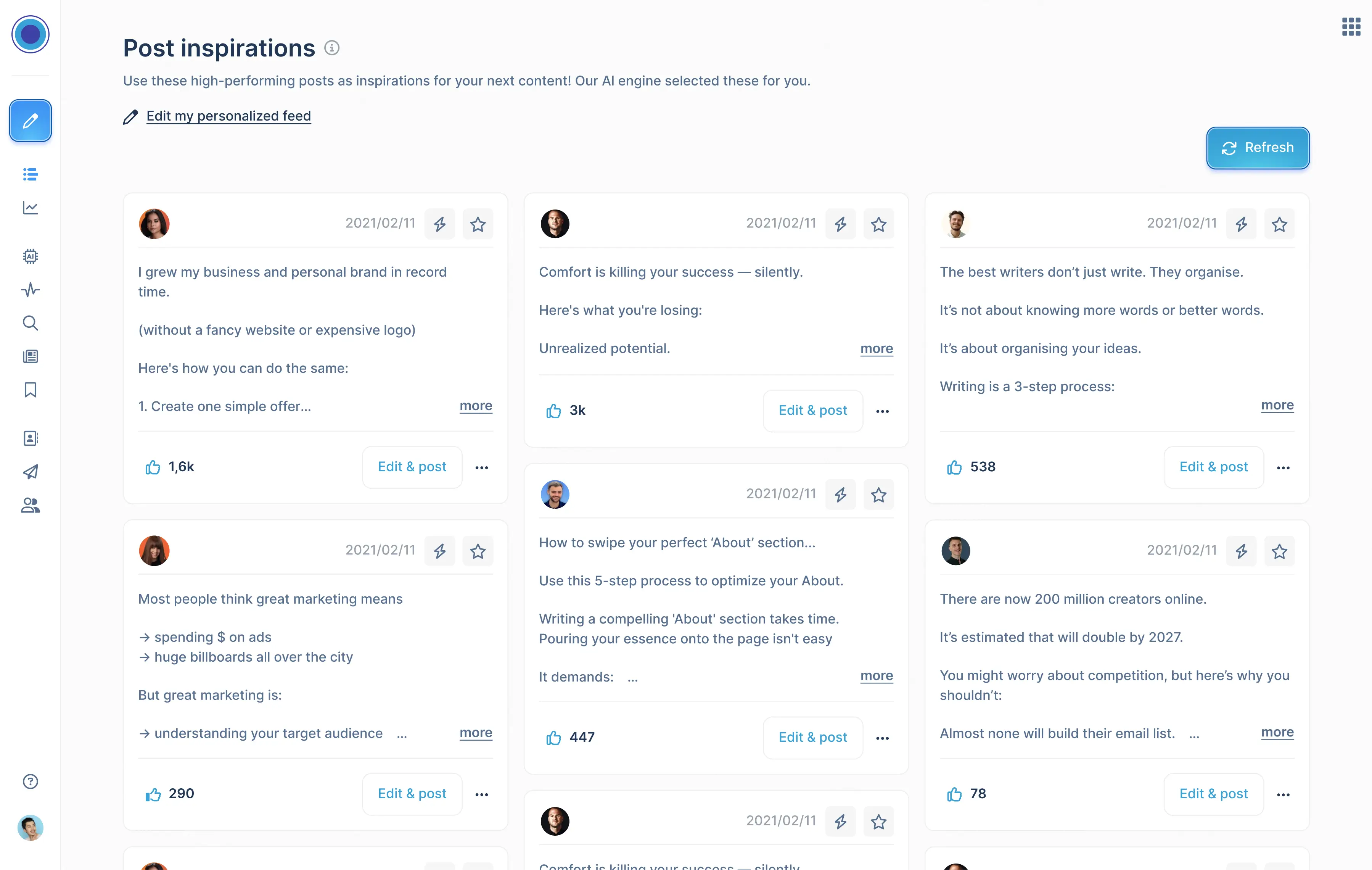
Taplio is a complete LinkedIn AI platform built for creators who want content generation, scheduling, and relationship building in one place. Its AI is trained on 500M+ LinkedIn posts and generates content, rewrites drafts, and creates carousels from YouTube videos or articles.
One thing to know before you sign up is the $39/mo. trap. The Starter plan has zero AI credits. AI generation requires the Growth plan at $69/mo. For sales-focused users, the Pro plan unlocks a 3M+ lead database (filtering contacts by industry, job level, and more), turning LinkedIn content into an active pipeline tool.
Notable Features
AI post generation: AI trained on 500M+ LinkedIn posts generates custom content based on your profile, industry, and posting history. Daily AI-generated post suggestions tailored to you.
Carousel creator: Input any topic, YouTube video URL, or article link and Taplio generates a LinkedIn carousel.
Engagement module: Build lists of people in your niche and engage with their posts systematically. Comment, reply, and get noticed by audiences you want to reach.
5M+ viral post library: Filter high-performing LinkedIn posts by topic and niche for inspiration. Available on all plans, including Starter.
LinkedIn analytics: Follower growth, impressions, engagement rates, and per-post performance data. Deeper than LinkedIn's native analytics.
Pros and Cons
Pros | Cons |
|---|---|
✅ AI trained specifically on LinkedIn content — output fits the platform natively | ❌ $39/mo. Starter has no AI credits — real entry for AI is $69/mo. |
✅ Carousel creator is among the best available for LinkedIn | ❌ LinkedIn only — no multi-platform support |
✅ Engagement automation for relationship building | ❌ Growth plan has 250 AI credits/mo. — heavy users may hit limits |
✅ 5M+ viral post library available on all plans | ❌ Account safety concerns have been reported by some users with automation features |
✅ Lead database on Pro is a genuine differentiator for sales teams | ❌ No visual generation — carousels yes, standalone images no |
Pricing
Plan | Monthly Price | What's Included |
|---|---|---|
Starter | $39/mo. | No AI credits, 1-click scheduling, 5M+ post ideas, carousel builder, analytics, Chrome extension |
Growth | $69/mo. | 250 AI credits, 500 comment credits, hook and post generator, AI copilot, auto-reply, smart engagement tools |
Pro | $199/mo. | Unlimited AI and comment credits, 3M+ lead database, auto-DM, mass messaging, auto-connection requests |
4. Buffer — Best for Multi-Platform Teams That Include LinkedIn
Buffer is best for businesses and creators managing multiple social channels who want AI-assisted writing and scheduling across all platforms from one dashboard. It currently holds a 3-star rating on Trustpilot.
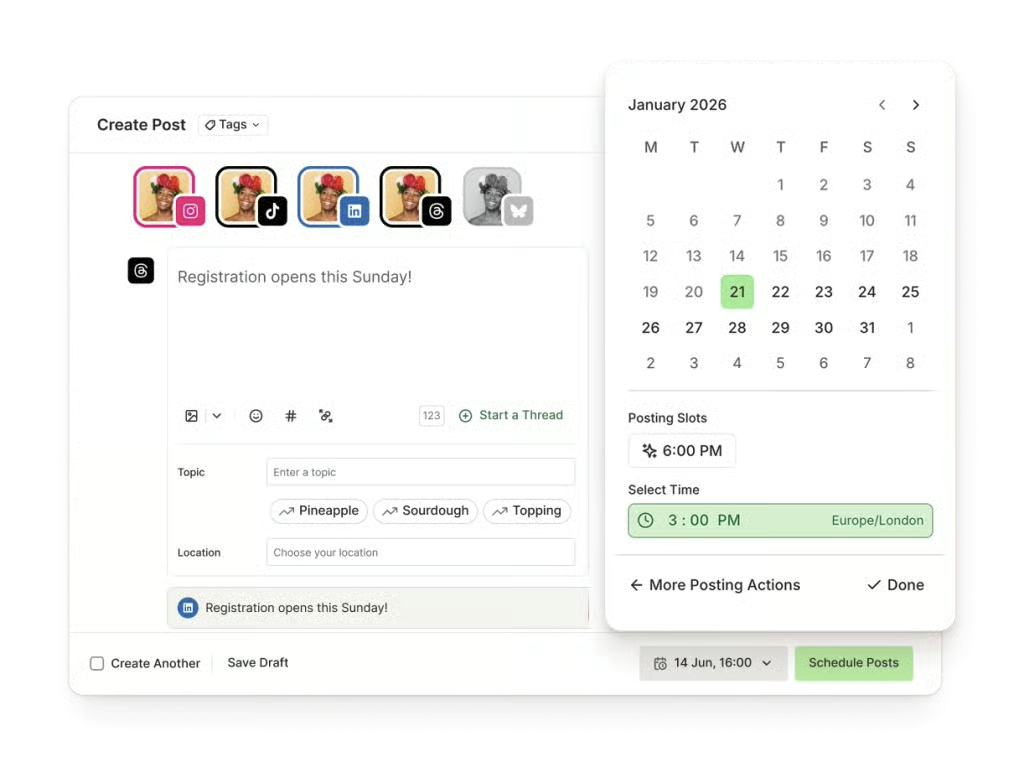
Buffer is a multi-platform social media scheduling suite covering LinkedIn, Instagram, Facebook, X, TikTok, Threads, and Bluesky from one dashboard. Its AI assistant helps write, repurpose, and adapt content across all your channels. The calendar, approval workflows, and team collaboration tools are among the strongest in the category.
Buffer's AI is an assistant you activate, not an agent that operates independently. It won't plan your month or generate a content queue without your input.
If LinkedIn is your only focus, a dedicated LinkedIn AI tool will serve you better, but if you're managing multiple channels and need a central hub, Buffer is one of the most capable options available.
Notable Features
AI assistant: Generates ideas, rewrites drafts, adjusts tone and length, and repurposes content for different platforms. Available on all plans, including free.
Multi-platform scheduling: LinkedIn, Instagram, Facebook, X, TikTok, Threads, Bluesky, and Pinterest from one calendar. Platform-specific formatting for each.
Content approval workflows: Built-in approval steps before publishing. Useful for teams or agencies where content needs review before going live.
Community inbox: Manage comments and replies across all connected channels from one place. Filter unanswered comments, get notifications, and respond without switching platforms.
Analytics and best-time-to-post: Performance tracking across all channels. Buffer analyzes your audience's engagement patterns and recommends optimal posting times per platform.
Start Page: A customizable link-in-bio page that connects your social presence to your content, products, and offers.
Pros and Cons
Pros | Cons |
|---|---|
✅ Best-in-class multi-platform scheduling — covers 8+ channels from one dashboard | ❌ AI is an assistant you activate, not an agent that operates autonomously |
✅ Free plan available with genuine functionality | ❌ No LinkedIn-specific features — carousels, engagement tools, or lead generation |
✅ AI assistant included on all plans including free | ❌ Per-channel pricing adds up for businesses on many platforms |
✅ Team collaboration and approval workflows built in | ❌ No visual generation — AI is text-only |
✅ Community inbox for managing all channel comments in one place | |
✅ Very affordable entry price at $6/mo. per channel |
Pricing
Plan | Monthly Price | What's Included |
|---|---|---|
Free | $0 | 3 channels, 10 scheduled posts/channel, AI assistant, basic analytics, community inbox |
Essentials | $6/mo. per channel | Unlimited scheduled posts, AI assistant, advanced analytics, hashtag manager, first comment scheduling |
Team | $12/mo. per channel | Everything in Essentials, unlimited team members, approval workflows, content access levels |
✅ Buffer is the right choice if LinkedIn is one of several channels you’re managing and you need a central hub for scheduling, collaboration, and analytics. It’s not the strongest standalone LinkedIn AI tool, but it’s one of the best multi-platform suites available.
5. Supergrow — Best for Teams and Employee Advocacy
Supergrow is best for marketing teams running employee advocacy programs and for executives who want to produce LinkedIn content through conversation rather than writing.
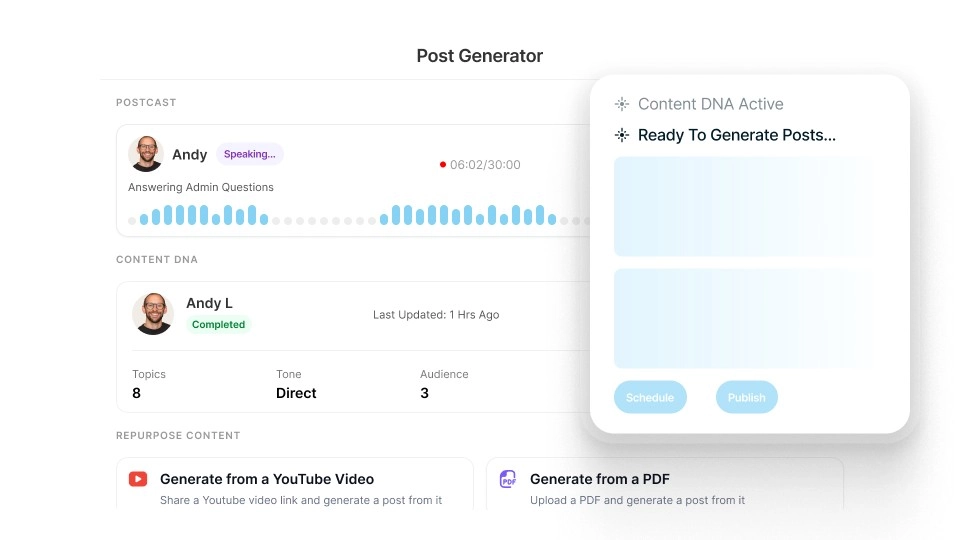
Supergrow's standout feature is Postcast: a 15-minute AI-guided interview that produces 5 to 7 publish-ready LinkedIn posts from a single conversation. For executives and subject matter experts who have plenty of insights but no time to write them out, it removes the biggest pain point in LinkedIn content creation entirely.
The Content DNA system builds a voice profile from your existing posts so generated content sounds like you rather than a generic LinkedIn template. On the team side, Supergrow is purpose-built for employee advocacy at scale, including approval workflows, organization dashboards, leaderboards, and per-member performance reports.
Everything runs on official LinkedIn APIs, so account safety is consistent across all team accounts.
Notable Features
Postcast: A 15-minute AI-guided interview produces 5 to 7 publish-ready LinkedIn posts. This is the fastest path from expertise to published content for people who hate writing.
Content DNA: Builds a voice profile from your existing posts and writing samples. The generated content sounds like you, not like a template.
Team advocacy tools: Approval workflows, org dashboards, leaderboards, challenges, and weekly per-member performance reports built specifically for employee advocacy programs.
Official LinkedIn API: All accounts (individual and team) use LinkedIn's official API. No browser extension automation and no account safety concerns.
MCP integration (early access): Connect Supergrow to Claude, ChatGPT, or any MCP-compatible client to manage your LinkedIn content pipeline through natural language.
Carousel and infographic maker (Pro+): Visual content creation for LinkedIn's highest-performing formats, included on Pro and above.
Pros and Cons
Pros | Cons |
|---|---|
✅ Postcast turns a 15-minute conversation into a week of posts | ❌ Team features only unlock at $139/mo. (4 accounts minimum) |
✅ Content DNA voice profiling is among the strongest available | ❌ Carousel and infographic maker only on Pro and above |
✅ Purpose-built team and employee advocacy features | ❌ MCP integration still in early access |
✅ Leaderboards and challenges drive team adoption | ❌ Postcast limited to 2 sessions on Starter plan |
Pricing
Plan | Monthly Price | What's Included |
|---|---|---|
Starter | $19/mo. | Content DNA, Postcast (2 sessions), scheduling, Kanban dashboard |
Pro | $39/mo. | Unlimited Postcast sessions, carousel maker, infographic generator, profile analytics |
Teams | $139/mo. | 4 accounts, approval workflows, organization dashboard, leaderboards, and weekly reports |
Enterprise | Custom | 10+ executives, SLA, dedicated onboarding, and API access |
✅ Supergrow is the strongest option for marketing teams running employee advocacy programs and for executives who produce content better through conversation than writing. Individual creators who just need a clean AI post generator will find it more than they need.
Which AI LinkedIn Post Generator Should You Choose?
Use this to match your situation to the right tool.
Your situation | Go with |
|---|---|
You want LinkedIn to run itself (AI plans, writes, and queues everything) | Zaturn (Chloe) — $69/mo. |
You want AI to generate LinkedIn posts on demand with scheduling and analytics | MagicPost — $49/mo. |
You want LinkedIn content plus engagement and lead generation tools | Taplio — $69/mo. for AI features |
You manage multiple social channels and want AI writing across all of them | Zaturn or Buffer — $69/mo. or $6/mo. per channel |
You produce content better through conversation than writing | Supergrow — $19/mo. |
You're running an employee advocacy program across a team | Supergrow Teams — $139/mo. |
You want the lowest entry price with LinkedIn AI features | Supergrow — $19/mo. |
You want to build a LinkedIn sales pipeline alongside content | Taplio Pro — $199/mo. |
You need LinkedIn plus multi-platform autonomous operation | Zaturn — covers all channels |
Final Thoughts
LinkedIn is the channel most B2B businesses know they should be using, and most aren't. Not because they don't see the value, but because keeping up with it is genuinely hard without a system.
If you want AI to generate LinkedIn posts on demand with a full content system built around the platform, MagicPost and Taplio are the dedicated options, but if you want your LinkedIn presence to run itself, Zaturn's Chloe is the only platform on this list built to do that.
Ready to see what LinkedIn looks like when it actually runs consistently? Zaturn’s 14-day free trial requires no credit card. Set up Chloe and have your first month of LinkedIn content ready to review in one session.