Best Alternatives to Buffer
Best for solo founders who just need a clean, affordable scheduler
Features
- Content Creation & AI — Basic
- Scheduling & Publishing — Excellent
- Analytics & Reporting — Basic
- Team Collaboration — Basic
- Pricing Value — Good
Pros & Cons
Pros
- Cleanest interface in the category
- Free plan covers three channels permanently
- Per-channel pricing means teams don't pay for seats they don't need
- AI assistant helps with caption generation and content repurposing
- No per-user pricing trap — affordable for teams of any size
Cons
- Content creation still lands entirely on you — the AI assistant helps but doesn't replace production
- Analytics cover post-level performance only — no competitor tracking or campaign reporting
- Per-channel pricing compounds fast for agencies managing multiple brands
- No content categorization, evergreen recycling, or campaign organization
- Approval workflows locked behind the Team plan at $12/channel/mo.
Why teams switch to Zaturn
- Chloe writes the content — you don't have to
- Consistent social media without the time drain
- Platform-specific captions, not reposts
- Visuals included — no Canva required
- Performance feeds back into future content
- Social is one of six channels
Compared platforms
Buffer
Zaturn
Planable
Metricool
SocialBee
Blaze
Publer
Feature comparison
| Feature | Zaturn | Planable | Metricool | SocialBee | Blaze | Publer |
|---|---|---|---|---|---|---|
| Starting Price | $69/mo. | $39/workspace | $25/mo. | $29/mo. | $79/mo. | $5/account |
| Free Plan | ❌ 14-day trial | ❌ 50 free posts | ✅ 1 brand | ❌ 14-day trial | ❌ 7-day trial | ✅ 3 accounts |
| Per-User Pricing | ✅ 3 accounts | ❌ Per workspace | ❌ Per brand | ❌ Flat rate | ❌ Flat rate | ❌ Per account |
| Content Creation | ✅ Full AI production | ❌ Caption help only | ❌ Caption help only | ✅ AI generation | ✅ Full AI production | ❌ Caption help only |
| Competitor Tracking | ✗ | ✗ | ✓ | ✗ | ✗ | ✓ |
| Approval Workflow | ✓ | ✓ | ✓ | ✓ | ✓ | ✗ |
| Evergreen Recycling | ✗ | ✗ | ✗ | ✓ | ✗ | ✓ |
| Ad Management | ✓ | ✗ | ✓ | ✗ | ✓ | ✗ |
Why Do People Switch From Buffer?
Buffer’s G2 score is 4.3/5 and the product is well-regarded. Most of the time, users switch away from it because they’re looking for something it’s not designed to do.
Pain point | What's actually happening |
|---|---|
Content creation still lands on you | Third-party review roundups consistently flag this as Buffer's primary limitation. The AI assistant generates ideas and rewrites text, but you're still responsible for coming up with the content, writing the drafts, sourcing the visuals, and deciding the strategy. Buffer makes publishing easier, but it doesn't reduce how much creative work is required. |
Analytics depth is limited | Buffer's analytics cover the basics (post performance, follower growth, and best times to post). Teams that need competitor tracking, cross-channel campaign reporting, or deeper audience analytics consistently outgrow it. Several alternatives in this tier offer meaningfully stronger reporting at comparable or lower prices. |
Per-channel pricing compounds at scale | At $6/channel/mo., Buffer is cheap for two or three channels. Managing five brands with four channels each means $120/mo. on Essentials before team features, which require the $12/channel Team plan. Tools with brand-based or flat pricing structures are significantly cheaper at this scale. |
No content structure or recycling | Buffer is a scheduling queue, not a content system. There's no content categorization, evergreen recycling, or campaign organization. Teams that want structured content workflows, like rotating content types, reusing evergreen posts, and running distinct campaign pillars, find Buffer too flat for how they actually work. |
Team features require the most expensive plan | Approval workflows and content collaboration are locked behind the Team plan at $12/channel/mo. For agencies managing multiple client accounts, this makes Buffer's team pricing less competitive than dedicated collaboration platforms. |
Buffer Alternatives at a Glance
Here’s a quick overview of our limitations before we delve into the actual breakdowns.
Tool | Starting Price | G2 Rating | Best For |
|---|---|---|---|
Zaturn (Chloe) | $69/mo. | Social media planned, written, and posted for you. No content production required | |
Planable | $39/workspace/mo. | Teams and agencies needing visual collaboration and client approval workflows | |
Metricool | Free / $25/mo. | Analytics depth and brand-based pricing that's cheaper than Buffer at scale | |
SocialBee | $29/mo. | Content categories, evergreen recycling, and AI generation for structured workflows | |
Blaze | $79/mo. | Content creation with an AI learning loop. It goes further than any pure scheduler | |
Publer | Free / $5/account/mo. | Cheaper than Buffer per account with a broader feature set at the entry price |
1. Zaturn — Best If You Want the Content Produced, Not Just Scheduled
Buffer's biggest limitation is that content creation still lands entirely on you. Chloe plans the calendar, writes platform-specific captions, creates on-brand visuals, researches hashtags, and publishes, while you approve what goes live.
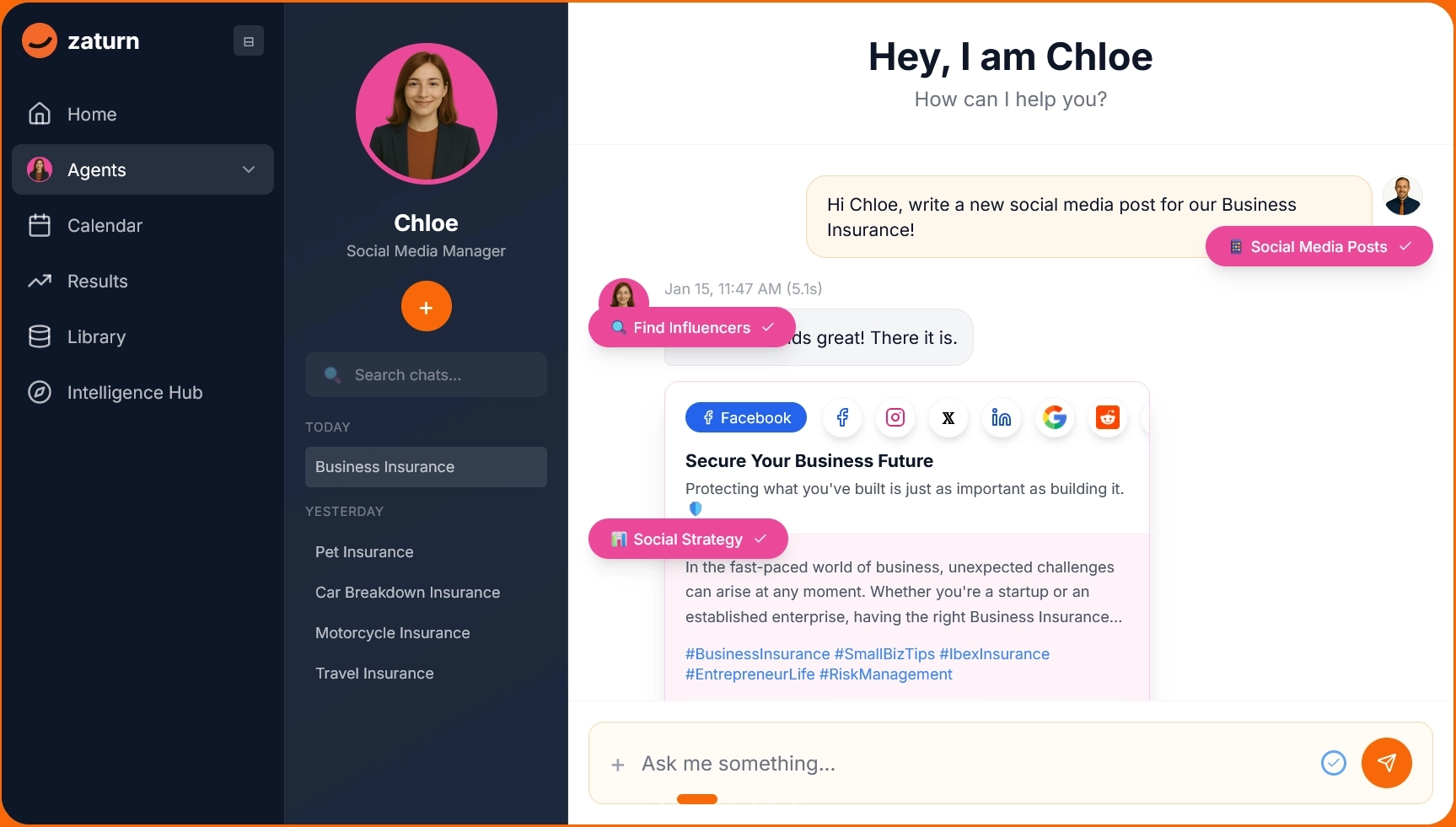
Buffer’s workflow is like so: You open it, schedule something, and still have to decide what to post, write the caption, source the visual, think about the hashtags, and do it again next week. That’s time-consuming.
Chloe is Zaturn's AI social media agent. Brief her once on your brand voice, goals, and audience, and she builds a full content calendar from there:
Platform-specific captions for LinkedIn, Instagram, X, and Facebook.
On-brand visuals generated from your brand identity.
Hashtag research per post. Everything queued for your review before it publishes.
Your social media runs consistently without you finding the time to produce it.
Notable Features
Full content calendar planning: Chloe decides what to post, when, and why, based on your goals, trending topics, and platform-specific best practices. You review the plan, not create it.
Platform-specific caption writing: Captions adapted per platform with the right length, tone, and format for LinkedIn vs. Instagram vs. X, not one post copy-pasted across channels.
On-brand visual creation: Scroll-stopping graphics using your logo, brand colors, and style. No Canva subscription or design skills are required.
Approval queue: Every post reviewed before it publishes. Edit, reject, or approve as-is; nothing reaches your audience without your sign-off.
Performance analytics feeding back into content: Engagement data tracked across platforms and used to inform what Chloe creates next. This is a feedback loop Buffer's AI assistant doesn't have.
Pros
✅ Solves the content production problem, not just the scheduling problem.
✅ Platform-specific captions written for each channel, not generic reposts.
✅ On-brand visuals included without a separate design tool.
✅ Approval workflow keeps you in control without producing everything yourself.
✅ All six Zaturn agents share the same brand context, meaning social, email, SEO, and ads stay consistent.
✅ 14-day free trial, no credit card required.
Cons
❌ More expensive than a pure scheduler at $69/mo. vs. Buffer's $6/channel/mo.
❌ All six Zaturn agents come as a package; you can't buy Chloe standalone
Pricing
Plan | Price | What's included |
|---|---|---|
Starter | $69/mo. | All 6 agents including Chloe, all integrations, 1 workspace, 1 user, unlimited content, 14-day free trial |
Growth | $129/mo. | Everything in Starter, 3 workspaces, 3 users, priority support, onboarding call |
Custom | Talk to Sales | Unlimited campaigns, white-label, multi-brand management, dedicated success manager |
If content creation is the bottleneck, not the scheduler, Chloe is the fix. Try Zaturn free for 14 days, no credit card required.
2. Planable — Best for Teams and Agencies Needing Approval Workflows
Buffer locks collaboration and approval workflows behind its most expensive plan. Planable is built entirely around that workflow. It offers visual content review, inline feedback, and client sign-off without anyone needing an account.
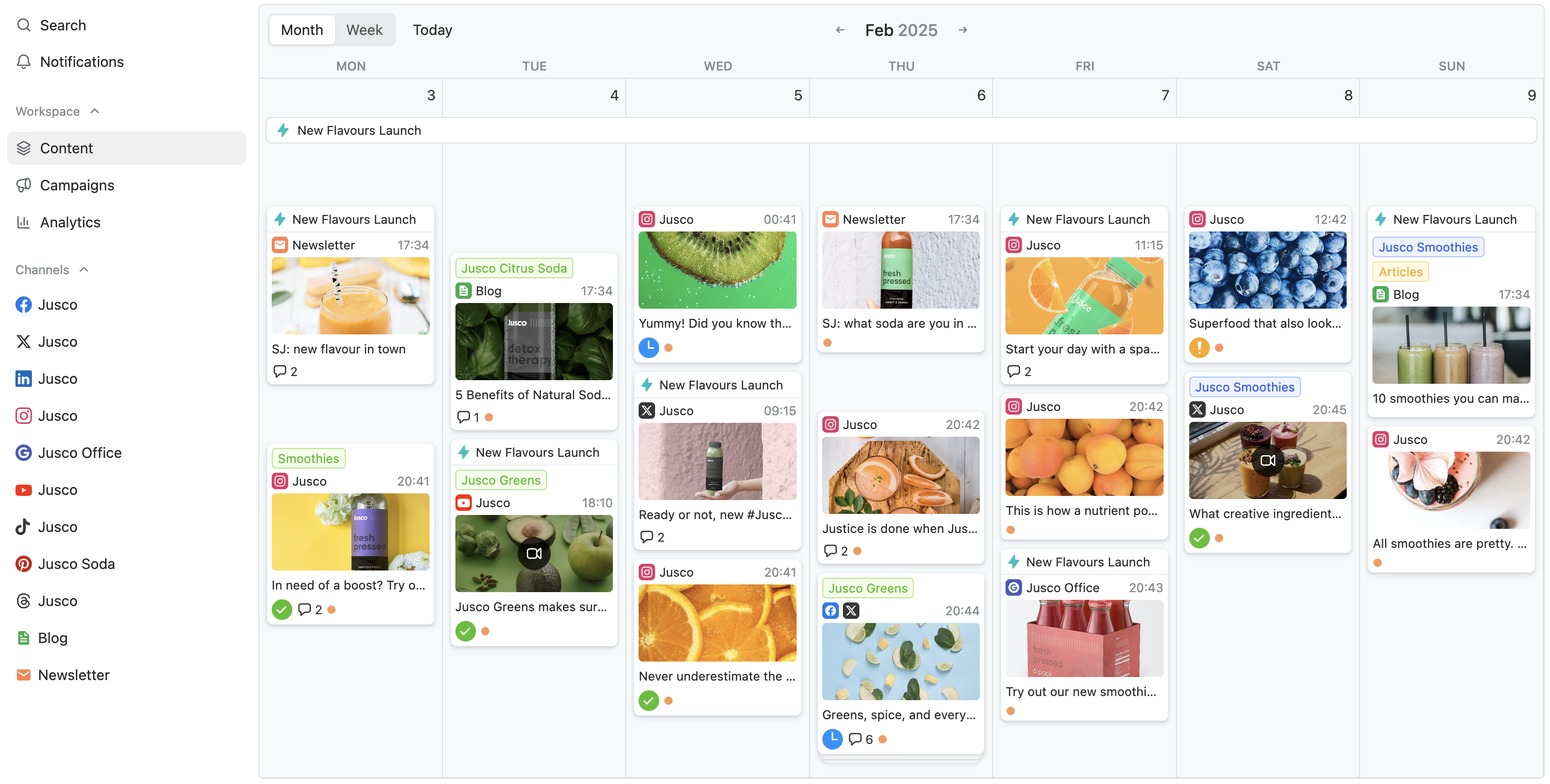
Buffer's Team plan at $12/channel/mo. adds approval workflows, but they're a feature on top of a scheduler rather than the core product.
Planable built its entire platform around the review and approval problem. Posts appear exactly as they'll look on each platform, clients and stakeholders comment inline, approvers sign off with one click and don't need an account to do it, and nothing publishes until it gets the green light.
For agencies managing content for multiple clients, the workspace model is clean. There are separate environments per brand, role-based permissions, internal comments hidden from clients until content is ready to share.
The AI assistant generates captions, rewrites text for different platforms, and pulls hashtags. At $39/workspace/mo. for the Basic plan, it's cheaper than Buffer's Team plan for agencies running more than three channels per client.
Notable Features
Visual approval workflow: Posts reviewed exactly as they'll appear on platform (feed, calendar, or grid view). Approvers comment inline and sign off without needing a Planable account.
Multi-brand workspaces with role permissions: Separate environments per client or brand. Internal feedback stays hidden from clients until content is ready to share.
AI caption generation: Generate captions with custom prompts, get captions from uploaded images and videos, rewrite text per platform style, and pull hashtag suggestions, all inside the composer.
9-platform support: Facebook, Instagram, TikTok, LinkedIn, X, Pinterest, YouTube, Google Business Profile, and Threads, with platform-specific post types including LinkedIn PDFs and Instagram Collab tags.
Annotation and suggestion tools: Clients and reviewers can annotate specific parts of a post or suggest exact text edits, which is more precise than a generic comment thread.
Pros
✅ Best approval workflow in the category. It’s visual, precise, and no account is required for external approvers.
✅ Per-workspace pricing avoids Buffer's per-channel scaling problem for agencies.
✅ Interface consistently rated cleanest in its category across G2 reviews.
✅ Annotation tools let clients give precise feedback on specific elements, not just general comments.
✅ 50 free posts to try before committing; no credit card is required.
Cons
❌ Analytics and social inbox are add-ons ($14 and $9 per workspace); they’re not included in base pricing.
❌ Post limits on Basic (60/mo.) and Pro (150/mo.). Unlimited is only on Enterprise.
❌ No content creation AI beyond caption generation. Planable schedules what you produce; it doesn't produce it.
❌ It’s less suitable for solo users who don't need the collaboration layer.
Pricing
Plan | Price | What's included |
|---|---|---|
Basic | $39/workspace/mo. | 60 posts/workspace/mo., unlimited users, 4 social pages, 2 approval types, feed and calendar views |
Pro | $59/workspace/mo. | 150 posts/workspace/mo., unlimited users, 10 social pages, 3 approval types, feed/calendar/grid views |
Enterprise | Custom | Unlimited posts, multi-level approvals, all views, SSO, dedicated account manager |
❓ Note: Analytics ($14/workspace/mo.) and social inbox ($9/workspace/mo.) available as add-ons on Basic and Pro.
3. Metricool — Best for Analytics Depth and Cheaper Multi-Brand Pricing
Buffer charges per channel, meaning costs compound as you add accounts. Metricool charges per brand: up to 10 brands for $25/mo. on Starter. At scale, that's dramatically cheaper. The analytics depth is also meaningfully better than Buffer's.
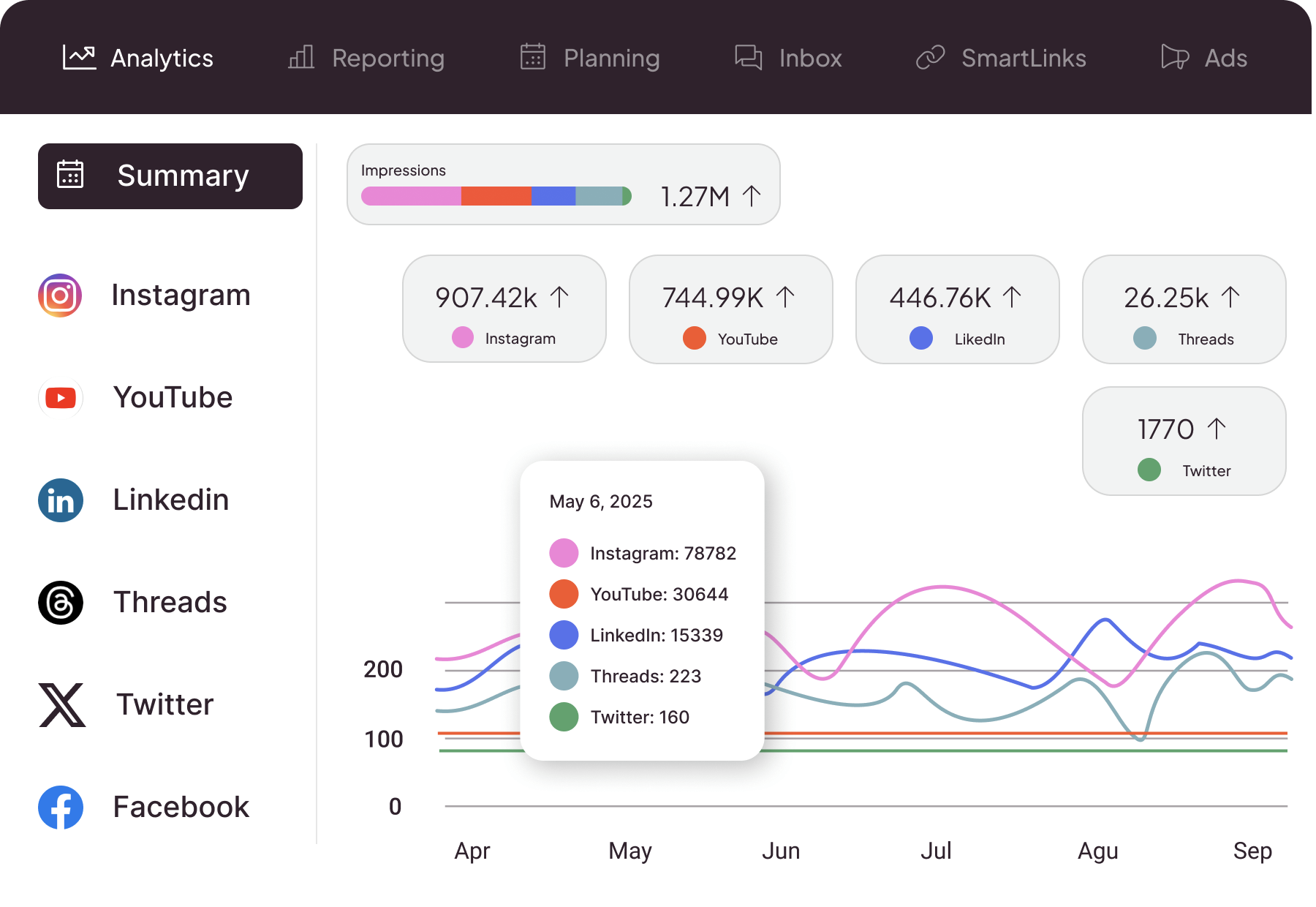
The pricing model alone makes Metricool worth evaluating. Buffer at $6/channel means managing three channels for one brand costs $18/mo.
Metricool's Starter plan at $25/mo. covers up to 10 brands, each with multiple connected channels. For a small agency managing four or five client accounts, that difference is significant before you even look at features.
The analytics are where Metricool outpaces Buffer. Competitor tracking (up to 100 profiles on Starter), PDF and PPT reports, analytics with unlimited history, and a Looker Studio connector on Advanced.
Buffer's analytics tell you how your posts performed. Metricool tells you how they performed relative to your competitors, over any time period, in a format you can send to a client. For teams that care about reporting, that’s a huge difference in capabilities.
Notable Features
Brand-based pricing: Pay per brand, not per channel, with up to 10 brands on Starter for $25/mo. The more accounts you manage, the more Metricool undercuts Buffer's per-channel model.
Competitor tracking: Monitor up to 100 competitor profiles on Starter, analyze their content performance, and see how your accounts stack up. That’s something Buffer doesn't offer at all.
PDF and PPT reports: Build presentation-ready reports from your analytics data on Starter and above. It’s useful for agencies presenting results to clients without manual export work.
Ad management integration: Connect Meta and Google ad accounts alongside your organic social to view paid and organic performance from the same dashboard.
AI social media assistant: Caption generation and content ideas included on every plan including Free; they’re not an add-on or a paid tier feature.
Pros
✅ Brand-based pricing is dramatically cheaper than Buffer's per-channel model at scale.
✅ Competitor tracking up to 100 profiles, which is a capability Buffer simply doesn't have.
✅ PDF and PPT report exports for client-facing agencies from Starter upwards.
✅ Ad management integration lets you view paid and organic in one dashboard.
✅ Free plan covers 1 brand with AI assistant, competitor tracking (5 profiles), and 30-day analytics.
Cons
❌ LinkedIn connection requires Starter; it’s not available on the free plan.
❌ Twitter/X is a paid add-on (~$5/connected account) even on Starter.
❌ API access only on Advanced ($67/mo.), not available to lower tiers.
❌ Post approval workflows locked behind Advanced; Basic and Starter users have no approval system
❌ Advanced team and client management requires Advanced plan or higher.
Pricing
Plan | Price | What's included |
|---|---|---|
Free | $0/mo. | 1 brand, all social networks except LinkedIn and Twitter/X, 20 posts/mo., 5 competitor profiles, 30-day analytics, AI assistant |
Starter | From $25/mo. | Up to 10 brands, unlimited publishing, 100 competitor profiles, LinkedIn, reporting tools, PDF/PPT reports, unlimited analytics history |
Advanced | From $67/mo. | Up to 50 brands, team and client management, post approval system, full Twitter/X analytics, Looker Studio connector, Metricool API |
Custom | Contact Metricool | Custom brands, white label, dedicated account manager, custom AI credits |
4. SocialBee — Best for Content Structure and Evergreen Recycling
Buffer is a scheduling queue, meaning posts go in and go out. SocialBee is a content system with categories, rotation schedules, evergreen recycling, and AI generation that structures how content works rather than just when it publishes.
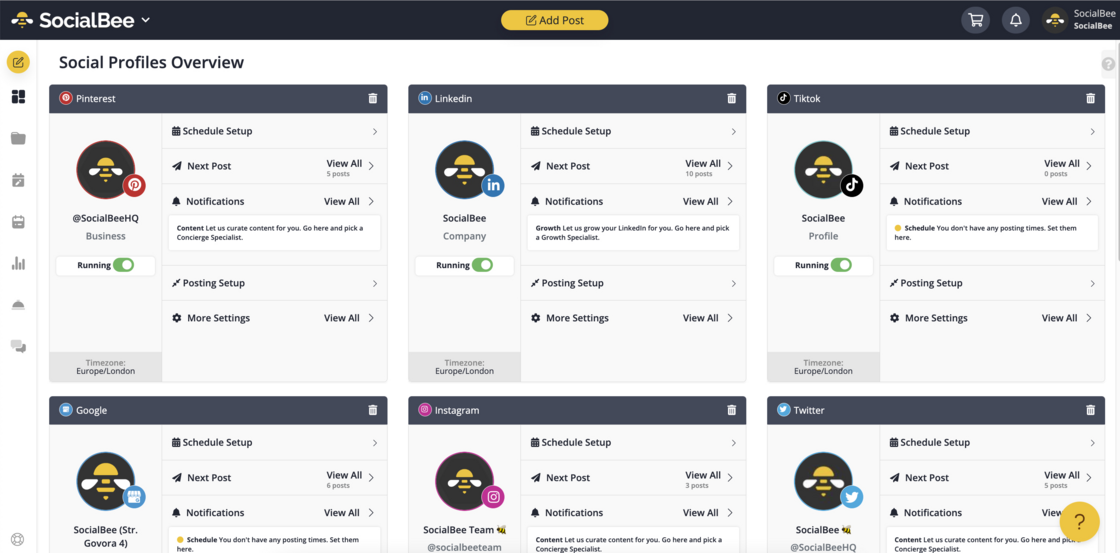
The fundamental difference from Buffer is how SocialBee thinks about content: Buffer has a queue, whereas SocialBee has categories.
You define your content pillars (educational, promotional, behind-the-scenes, evergreen tips) and assign posts to each.
The platform then rotates through categories on a schedule, ensuring your content mix stays balanced without manual planning every week.
Evergreen posts recycle automatically rather than disappearing after a single publish.
The AI content generation is also more integrated than Buffer's assistant. Unlimited AI generation is available on all plans; it’s not a limited feature or an upgrade.
Generate posts based on your content categories, repurpose a URL or existing piece of content into multiple posts, or bulk-create a week's worth of content from a single prompt.
For small businesses running structured content programs, SocialBee removes the weekly content decision overhead that Buffer still leaves on you.
Notable Features
Content categories and rotation: Organize posts into content pillars and set rotation rules; the platform manages the mix so you don't manually balance educational vs. promotional vs. evergreen every week.
Evergreen content recycling: Posts marked as evergreen republish automatically on a schedule; your best-performing content keeps circulating without manual re-queuing.
Unlimited AI content generation on all plans: Generate posts from URLs, repurpose existing content, or create from scratch based on your content categories. No credit limits or add-on required.
Bulk post editor and CSV uploads: Edit multiple posts simultaneously or import a full content batch from a spreadsheet. This is useful for agencies and teams building content in advance.
Post approval system on Accelerate and Pro: Built-in approval workflow for team review before publishing, included at $49/mo. rather than requiring Buffer's per-channel Team upgrade.
Pros
✅ Content category system removes the weekly “what do I post” decision overhead.
✅ Evergreen recycling keeps your best content circulating without manual effort.
✅ Unlimited AI generation on every plan, not a limited assistant or paid add-on.
✅ Flat pricing, not per-channel, so costs don't compound as you add social accounts.
✅ 14-day free trial on all plans.
Cons
❌ No free plan; trial only before committing to paid.
❌ Bootstrap plan limited to 5 social profiles, which agencies quickly outgrow.
❌ Analytics limited to 3 months of history on Bootstrap. Accelerate required for 2 years.
❌ Approval workflows only on Accelerate ($49/mo) and above.
❌ Interface has more learning curve than Buffer's deliberately simple design.
Pricing
Plan | Price | What's included |
|---|---|---|
Bootstrap | $29/mo. | 5 social profiles, 1 user/workspace, 10 content categories, unlimited AI generation, analytics up to 3 months |
Accelerate | $49/mo. | 10 social profiles, 50 content categories, unlimited AI, advanced analytics up to 2 years, bulk editor, post approval |
Pro | $99/mo. | 25 social profiles, 3 users/5 workspaces, unlimited categories and sources, advanced analytics, export reports, internal notes |
5. Blaze — Best for Content Creation That Improves Over Time
Every scheduler on this list publishes content you write. Blaze writes it too, and its AI Learning Loop analyzes what performs and feeds that back into future content. The longer you use it, the better the output gets.
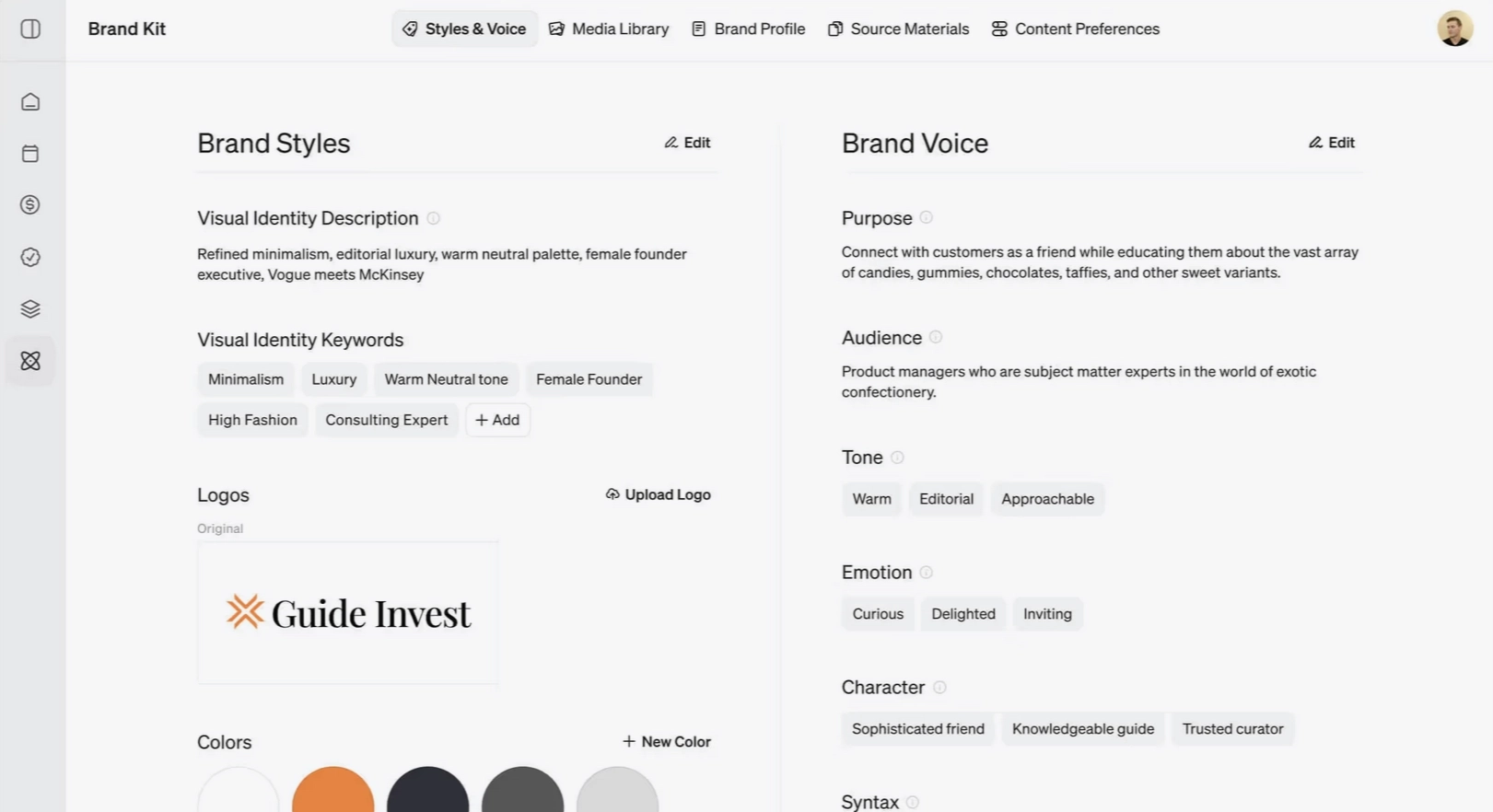
Buffer's limitation is that you still have to produce all the content yourself. Blaze starts earlier in that process.
The AI creates a brand identity from your inputs, builds a content strategy, writes posts, generates visuals, and begins publishing, with a learning loop that analyzes which posts perform and feeds that data back into future content creation.
It's not just that Blaze creates content instead of you. It's that the content gets measurably better over time as the AI learns what works with your specific audience.
The Copilot mode queues everything for your review before it publishes. It’s close to the Buffer experience, but with the content already written. The autonomous mode removes the review step and runs the whole operation on rules you set once.
For businesses where social media is a consistent priority but a consistent time drain, Blaze changes the equation more fundamentally than any other tool on this list.
Notable Features
AI Learning Loop: Analyzes post performance and uses it to improve future content. Buffer tracks analytics but doesn't use them to change what it suggests. The gap widens the longer you use Blaze.
Full content creation pipeline: Brand identity setup, content strategy, caption writing, image generation. The whole production process before a post ever reaches the scheduler.
Copilot and autonomous modes: Copilot queues everything for your approval before publishing. Autonomous mode runs the full operation on rules you set. Posts go out without manual review.
Automated ad boosting: Identifies top-performing content and automatically boosts it with paid promotion, a capability none of the pure schedulers on this list offer.
Done-For-You plans: A human expert strategist handles the full social media operation alongside the AI for businesses that want execution entirely off their plate, not just made easier.
Pros
✅ Only tool on this list where content creation quality improves over time via AI Learning Loop
✅ Full content production included — not just scheduling what you already wrote
✅ Automated ad boosting for top content across all plans
✅ Done-For-You option adds a human strategist for full-service execution
✅ Autonomous mode runs the operation entirely after a one-time setup
Cons
❌ More setup required than a simple scheduler — not a drop-in Buffer replacement
❌ Generation credits on Starter (300/mo) restrict high-volume content operations
❌ Done-For-You plans from $999/mo with a 6-month minimum commitment
❌ No deep social listening, unified inbox, or competitor monitoring
Pricing
Plan | Price | What's included |
|---|---|---|
Starter (DIY) | $79/mo. | 3 posting accounts, 600 generation credits, automated ads, 1 seat |
Growth (DIY) | $149/mo. | 10 posting accounts, 1,500 credits, unlimited users, yearly planning window |
Organic Growth (DFY) | $1,049/mo. | Expert strategist, 10 social accoutns, 40 posts/mo., 12 blogs/mo., 12 emails/newsletters/mo. |
Paid Ads (DFY) | $1,049/mo. | 1 platform, unlimited campaigns, 10 ads per month |
Website & Landing Pages (DFY) | $1,049/mo. | 2 landing pages/mo.; copy, design, and mobile-first build; conversion optimization; pixel + form integration; hosted on your domain |
AI SDR (DFY) | $1,049/mo. | Books jobs 24/7, never miss a call, instant replies that win jobs, send quotes in one tap |
Reputation Management (DFY) | $1,049/mo. | Monitor reviews acrosss all platforms, AI-drafted responses, fresh reviews, crisis alert, monthly report |
Video Editing | $400/mo. | Six 15 to 30 second videos, up to 6 scripts, 1 round of revisions (raw footage required) |
Ad Creative | $400/pack | 8 ads per pack, up to 4 videos, optimized for conversion, available for any ad platform |
UGC | $700 to $1200/pack | 2 videos per pack, real creators shooting real footage, pricing varies per creator, run as paid or organic content |
6. Publer — Best If You Just Want Something Cheaper Than Buffer
Publer's paid plans start at $5/account/mo. (cheaper than Buffer's $6/channel/mo.), with a broader feature set at the entry price including RSS automation, thread composers, and a link-in-bio page. It’s the straightforward step down if price is the only issue.
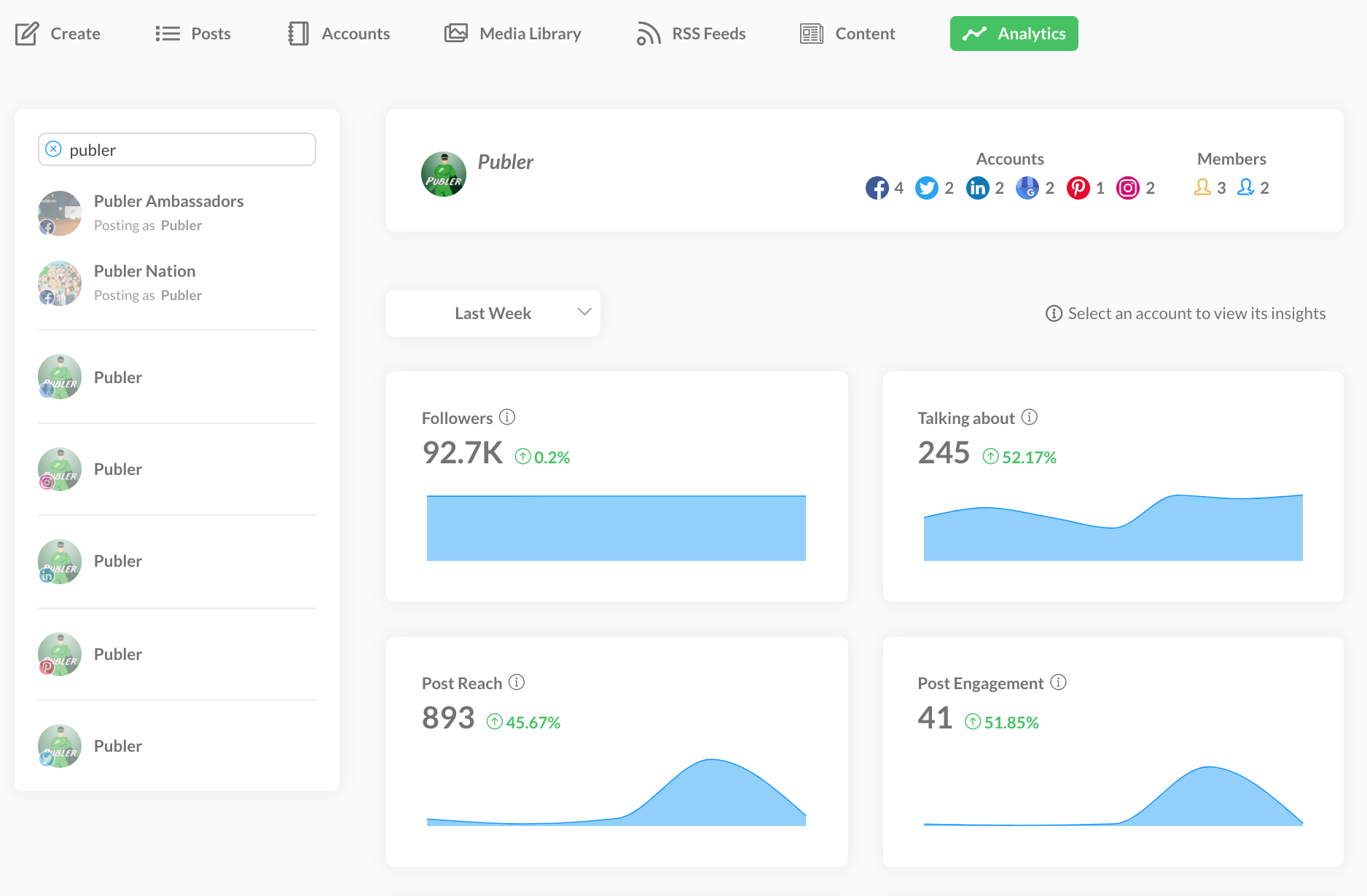
Publer occupies the cleanest niche on this list: it does what Buffer does, costs less, and includes features Buffer locks behind higher tiers.
The Professional plan at $5/account/mo. includes unlimited scheduled posts, unlimited RSS feed automations, unlimited workspaces, thread composers for X, Threads, Bluesky, and Mastodon, and an unbranded link-in-bio page. Buffer's $6/channel Essentials plan has none of the RSS automation or thread composers.
The Business plan at $10/account/mo. adds analytics insights, competitor analysis, hashtag analytics, and spintax-powered post recycling: capabilities Buffer doesn't offer at any comparable price point.
For a solo creator or small team that chose Buffer for its simplicity and price, Publer offers more at a lower cost without a steeper learning curve.
Notable Features
$5/account/mo. on Professional: Unlimited scheduled posts, unlimited RSS automations, unlimited workspaces and media, and a link-in-bio page. That’s more than Buffer's $6/channel Essentials.
RSS feed automations: Connect feeds from sites you follow and Publer auto-schedules posts from new content. Buffer has RSS but limits automation on lower plans.
Thread composers for multiple platforms: Native thread creation for X, Threads, Bluesky, and Mastodon, all on Professional. Buffer's thread support is more limited.
Competitor analysis and hashtag analytics on Business: At $10/account/mo, Business adds competitor tracking and hashtag performance analytics, which is a significant step up from Buffer's analytics at a comparable price.
API access on Business: Publer's API is available on Business plans; it’s useful for teams wanting to integrate social scheduling into their own workflows or tools.
Pros
✅ Cheaper than Buffer per account. $5/account vs. $6/channel on comparable plans.
✅ RSS automation unlimited on Professional. Buffer restricts this on lower plans
✅ Thread composers for X, Threads, Bluesky, and Mastodon on Professional.
✅ Competitor analysis and hashtag analytics on Business without a significant price jump.
✅ API access on Business; Buffer's API is more limited in scope
Cons
❌ No WhatsApp Business integration.
❌ Free plan excludes X/Twitter and requires a paid plan to connect.
❌ API is restricted to Business and Enterprise; it’s not available on Professional.
❌ Less polished interface than Buffer's famously clean design.
❌ Agency scaling with multiple clients requires careful account management.
Pricing
Plan | Price | What's included |
|---|---|---|
Free | $0/mo. | 1 user, 1 workspace, 3 social accounts (no X/Twitter), 10 scheduled posts/account, link-in-bio |
Professional | $5/account/mo. | Unlimited scheduled posts and drafts, unlimited RSS automations, thread composers, unbranded link-in-bio, unlimited workspaces |
Business | $10/account/mo. | Everything in Professional, unlimited AI prompts, analytics and reports, competitor analysis, hashtag analytics, post recycling, API access |
Enterprise | Custom | Everything in Business, volume discounts, 1:1 onboarding, prioritized support, bank/wire transfer |
How to Pick the Right Buffer Alternative
The right switch depends on which Buffer limitation is actually the bottleneck for you.
Your situation | Best fit |
|---|---|
You're still writing all the content yourself and want that to change | Zaturn (Chloe) — $69/mo., content planned, written, and posted for you |
You manage client accounts and need visual approvals and collaboration | Planable — $39/workspace/mo., best approval workflow in the category |
Analytics depth and per-brand pricing at scale are the issues | Metricool — from $25/mo. for 10 brands, competitor tracking, PDF reports |
You want structured content workflows and evergreen recycling | SocialBee — from $29/mo., content categories, unlimited AI generation |
You want content that gets created and improves over time | Blaze — from $79/mo. annually, AI Learning Loop, full content pipeline |
You just want something cheaper with more features at entry level | Publer — $5/account/mo., more than Buffer at a lower price |
Buffer Schedules. Zaturn Creates.
Every tool on this list is still fundamentally a scheduling platform; you're still the one responsible for deciding what to post and doing the creative work to produce it.
Zaturn’s Chloe plans the content strategy, writes the captions, generates the visuals, researches the hashtags, and queues everything for your review.
For a small business where social keeps getting deprioritized when everything else takes over, that might be the solution you’ve been looking for.
Try Zaturn free for 14 days; no credit card is required. Most users have their first week of social content ready to approve within their first session.